Commander deck builder
The free Commander deck builder that checks your list, not just stores it
Most deck sites are somewhere to keep a decklist. The Pod Companion keeps it and grades it: the mana base run through the same exact hypergeometric math as our calculators, a Commander bracket floor, a price that updates nightly, and the deck's actual win rate if you also log your games here. Import from Moxfield, Archidekt or TappedOut in one paste. Free, public by default, private with one switch, no premium tier.
- Free, no premium tier
- Imports in one paste
- Your deck's real win rate
Five ways in
Start from a list you already have
Nobody wants to retype a 100-card deck to try a new site, so there are five ways in and only one of them is typing:
A deck URL
Paste a public Moxfield, Archidekt or TappedOut link and the list opens in the editor for you to look over before anything saves.
Your Moxfield decks, listed
Link your Moxfield username once on your account page and your public decks appear for one-click import. Anything imported that way keeps a Re-import button that refreshes it from the source while the deck holds on to its id, name, description, sharing settings and game record.
An official Commander precon
Search by deck, commander or set, and every card lands pinned to its as-printed precon printing. Handy if you want to see what the box actually gives you before you start cutting. The precon upgrade guides take it from there.
A pasted decklist
One card per line, with optional
Sideboard:andMaybeboard:headers. Bulk edit lets you keep working on the whole list as text at any point afterwards.From nothing
A name box that autocompletes against every card in Magic, with an advanced search behind it when you don't know the name yet.
The editor
Building the list
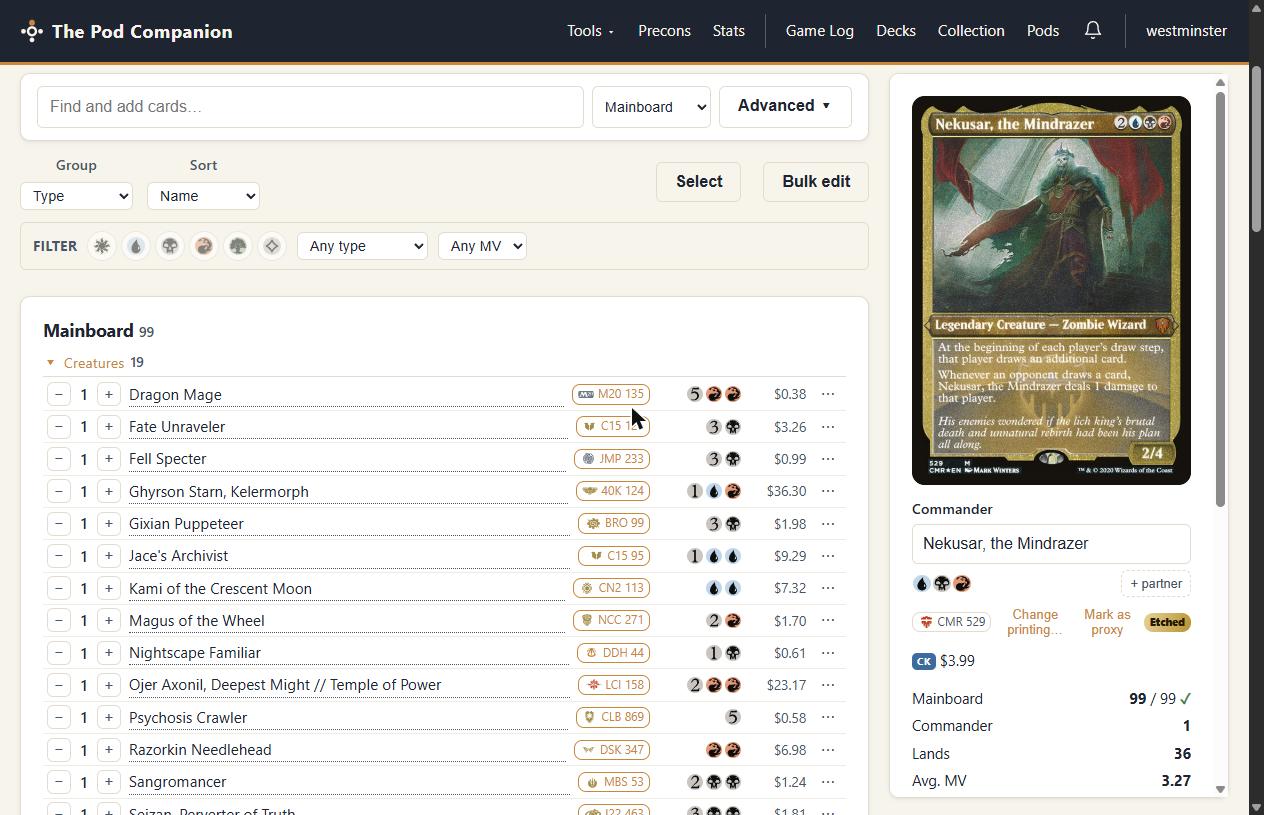
The editor is a working surface, not a form. Three boards (mainboard, sideboard and maybeboard) and a set of controls aimed at the parts of deck building that are actually tedious:
- Advanced search across all of Magic. Filter by color or color identity (with a match mode, so “exactly these colors” and “at most these colors” are different questions), type, set, rarity, mana value range, price range and format legality, then add straight from the results.
- Group and sort however you're thinking. Group by type, your own categories, mana value, color or rarity, and sort by name, mana value or price. Categories are yours to invent: ramp, interaction, wincons, whatever your list is organised around in your head.
- Edit many cards at once. Select mode turns the list into checkboxes, and the action bar can re-categorise, move between boards, mark as proxy, or remove the whole selection in one go.
- Partner commanders, with the color identity pips updating as you set them.
- Proxy marks. Flag the cards you're playing as proxies and they stop counting toward the deck's price, which is the only honest way to price a list that's half proxied.
- Recommendations from EDHREC, in a panel you open when you want them rather than a wall of suggestions you didn't ask for.
- Drafts that autosave. Edits to a shared deck save privately as you go, and viewers keep seeing your last published list until you publish. Nobody watches you rebuild the mana base in real time.
The analysis
The analysis is the reason to build here
This site started as a mana base calculator, and the deck builder inherited the engine. Every deck page has an Analytics tab that runs the real math against your real list, rather than a lookup table or a grade out of ten:
- Castability, spell by spell. It runs the same hypergeometric engine as the deck mana audit, assumes one land drop a turn on the play, and reports which cards you can't reliably cast on curve. The commander is excluded from the draw odds, because it starts in the command zone.
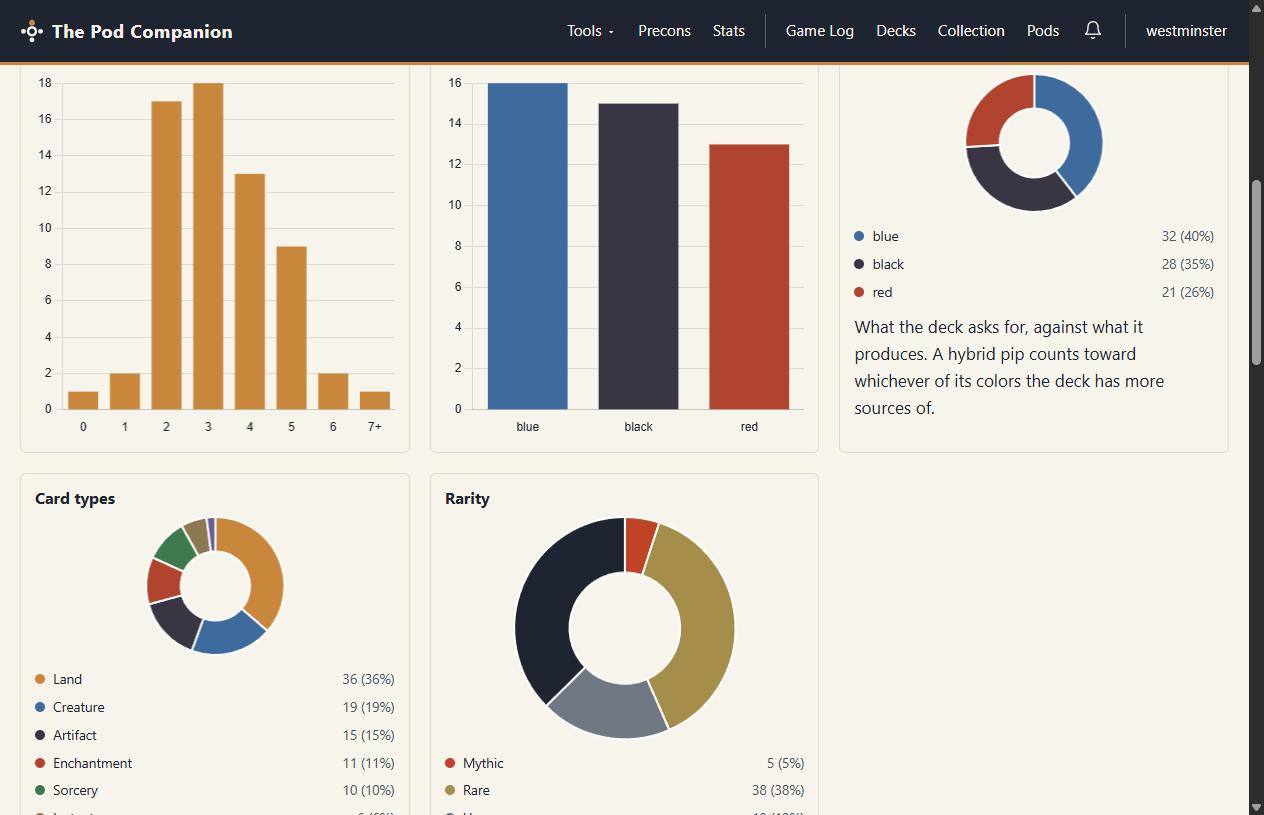
- Mana curve, sources by color, and colored pips side by side. That puts demand next to supply, which is the comparison that actually tells you whether the mana base fits the deck. Hybrid pips count toward whichever color you have more sources of.
- Deck check. Anything outside the commander's color identity, and anything banned in Commander, is called out by name.
- A Commander bracket floor from the same checker behind the brackets guide, so you know what you're bringing before somebody at the table asks.
- Card types and rarity breakdowns, and a sample hand you can shuffle up and keep drawing from.
- Tokens and counters this deck makes, gathered from the actual card text, so you know what to bring in the token box.
Only here
The one thing no other deck builder can show you
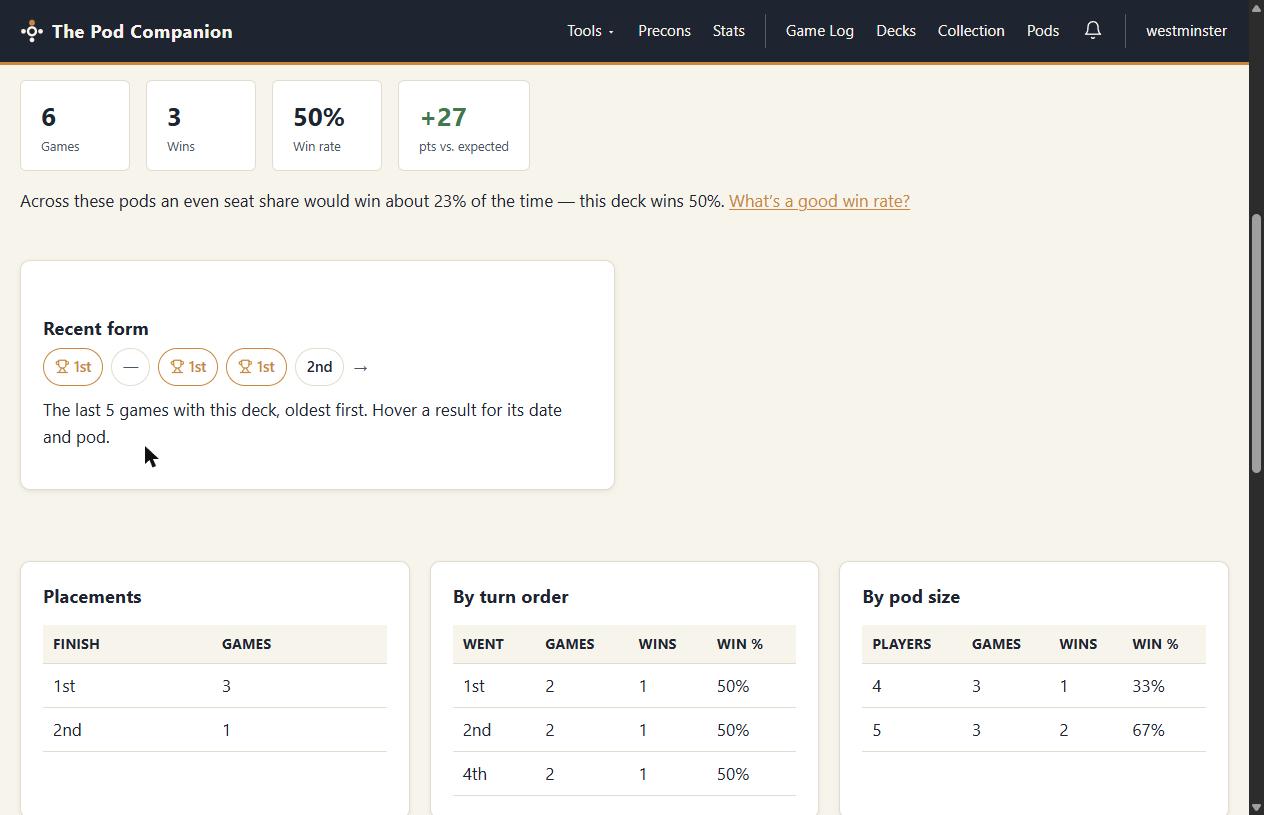
The Pod Companion also has a Commander game tracker, and the two halves talk to each other. Log a game and it attaches itself to the deck you played, which means each deck page carries a Stats tab with things a deck site simply cannot know: this deck's win rate, its recent form, how it places, how it does on each seat in turn order, and how it does against three opponents versus four.
It is honest about small samples, too. A deck with three logged games is flagged as a deck with three logged games, not paraded as a 33% win rate. If you'd like the reasoning behind that, the win rate math page works through how many games it takes before a number means anything.
And the rest
Prices, sharing, your binder, and getting it back out
Prices that don't pretend to be live quotes
Every deck carries a value, priced from the printings you actually pinned. A snapshot runs once a night, so the deck page can draw deck value over time against both TCGplayer and Card Kingdom. A night a vendor was unreachable shows as a gap in the line, never as $0. There's also a price at cheapest printings toggle for the more interesting question: what would this deck cost if you weren't precious about which version of each card you bought? Cards you've marked as proxies stay at zero throughout.
Where a card has no price data at all, the page shows nothing rather than a guess. That rule holds everywhere on this site.
Share it, or don't
Decks are public by default, which puts the deck on your player profile and gives it a proper share card when you post it. Two other settings exist when you want them: unlisted, readable by anyone with the link, and private, visible only to you. Shared decks can take comments (with
@playermentions and[[Card Name]]tags that expand into card previews), and you can turn comments off per deck without deleting the ones already there.Publishing a change to the card list also snapshots a version, so the deck page can show the timeline, diff any two versions, and tell you how the deck did on each of them. That is optional as well.
It knows what's in your binder
If you use the collection tracker, mark a deck “built from my collection” and its cards are reserved from your collection. A single copy of a card then can't quietly count as sleeved in three decks at once. Your other decks show it as committed elsewhere. It works the other way too: Add deck to my collection takes a list you've just built and files its cards into a new bin named after the deck.
Take the list with you
Every deck exports to MTG Arena, Magic Online (.txt), or a spreadsheet CSV that carries every board plus the commanders, one row per deck row. Nothing you build here is trapped here, and each export says up front what it can and can't carry rather than silently dropping cards.
Free, with no premium tier
Bring a list, see what it really does
Paste a link from Moxfield, Archidekt or TappedOut, save the deck, and its page does the math.
FAQ
Do I have to pay to build decks here?
No. The deck builder is free and there is no premium tier to upgrade to. Unlimited decks and unlimited cards are included, and so is every piece of the analysis: the mana math, the bracket floor, the price history and the sample hand. The only thing you need is a free account, because the decks have to be saved somewhere.
Can I import a deck I already built on Moxfield or Archidekt?
Yes. Paste a public Moxfield, Archidekt or TappedOut deck URL and the list opens in the editor for you to review before it saves. If you link your Moxfield username on your account page, your public Moxfield decks are listed for one-click import, and a deck imported that way keeps a Re-import button that refreshes it from the source without losing the deck's id, name, description, sharing settings or game record.
Can I pin a specific printing or a foil copy?
Yes, and this is deliberate. Adding a card from search gives you Scryfall's default printing, which follows reprints. The Printing picker instead pins one exact version, and each row carries its own finish: nonfoil, foil, or etched. Pinned printings survive a bulk text edit and a re-import, and they are what the deck's price is calculated from.
Who can see the decks I build?
Everyone, unless you decide otherwise. A new deck is public by default, which puts it on your profile and lets it be found. You can switch any deck to unlisted, which makes it readable only by someone with the link, or private, which keeps it to you alone. Two further switches are yours alone: whether viewers see the deck's game record, and whether comments are open at all.
Does the deck builder know which cards I actually own?
If you also track your collection here, yes. Tick “Built from my collection” on a deck and its cards are reserved from your collection, so a single copy of a card cannot be silently counted as sleeved in three decks at once. The other decks show that copy as committed elsewhere. It is off by default, because decks you don't own in paper are a normal thing to build.
Can I get my decklist back out again?
Yes. Every deck page has an Export panel with three formats: MTG Arena, Magic Online (.txt), and a spreadsheet CSV that carries every board plus the commanders, one row per deck row. Nothing you build here is trapped here.